
Dual Clock
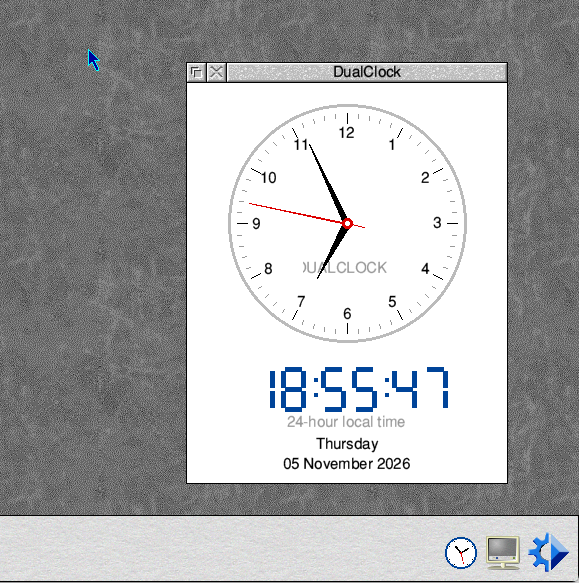
A compact desktop clock with analogue face, digital time and local date. Switch between 12-hour and 24-hour display.
Facts & requirements
RISC OS 5 desktop.
- Platform: RISC OS 5
- Uses the time and territory configured in RISC OS
- Includes editable BBC BASIC source
- Languages: BBC BASIC V; Python for the build tools.
A little Acorn on your computer
You can enjoy RISC OS under emulation. Visit RPCEmu for downloads and setup instructions, then choose a RISC OS setup that meets the app’s requirements.
Using HostFS? On the app’s page, choose the HostFS ZIP ,a91 button. It downloads the same archive with ,a91 appended to its filename: for example, Tracks-v1.2.2-riscos5.zip,a91. This tells HostFS that it is a RISC OS ZIP archive.
Copy the downloaded archive into your emulator’s HostFS folder. Open it from inside RISC OS and extract it with a RISC OS archive utility so the application’s filetypes are preserved. Use Download ZIP for the original .zip filename.
With thanks to the developers and contributors of RPCEmu and Arculator for their emulators.
Sources and licences
The MIT licence covers OakAcorn’s original contributions. Keep the copyright and permission notice with copies or substantial portions. The clock uses the time, date and territory settings supplied by RISC OS.
Third-party sources
The clock draws its own face and digits. Its external sources are the system documentation and build tools below.
Build tools and references
| Source | How it is used | Licence or notice |
|---|---|---|
| Python 3 | Runs the supplied build script on the development computer. | Python licence and notices |
| RISC OS programming manuals | Reference for desktop, BASIC and operating system calls. | Manuals’ own notices |
| Wimp programming guide | Reference for the native desktop interface. | Publication’s own notices |
| Info-ZIP extra-field specification | Reference for preserving Acorn file types in the archive. | See specification and its notices |
Supplied free for enjoyment and experimentation, without warranty. The download includes the applicable licence notices.
Open it up. Make it your own.
We encourage you to open up Dual Clock, explore the source, learn how it works and change what we have made.
If you release your own version, we would love a message at feedback@oakacorn.co.uk so we can see where you have taken it.
This is a friendly invitation. The supplied licences set out your rights and the terms for each component.